 inkmate
A discount code on every packing slip, so your customer orders again
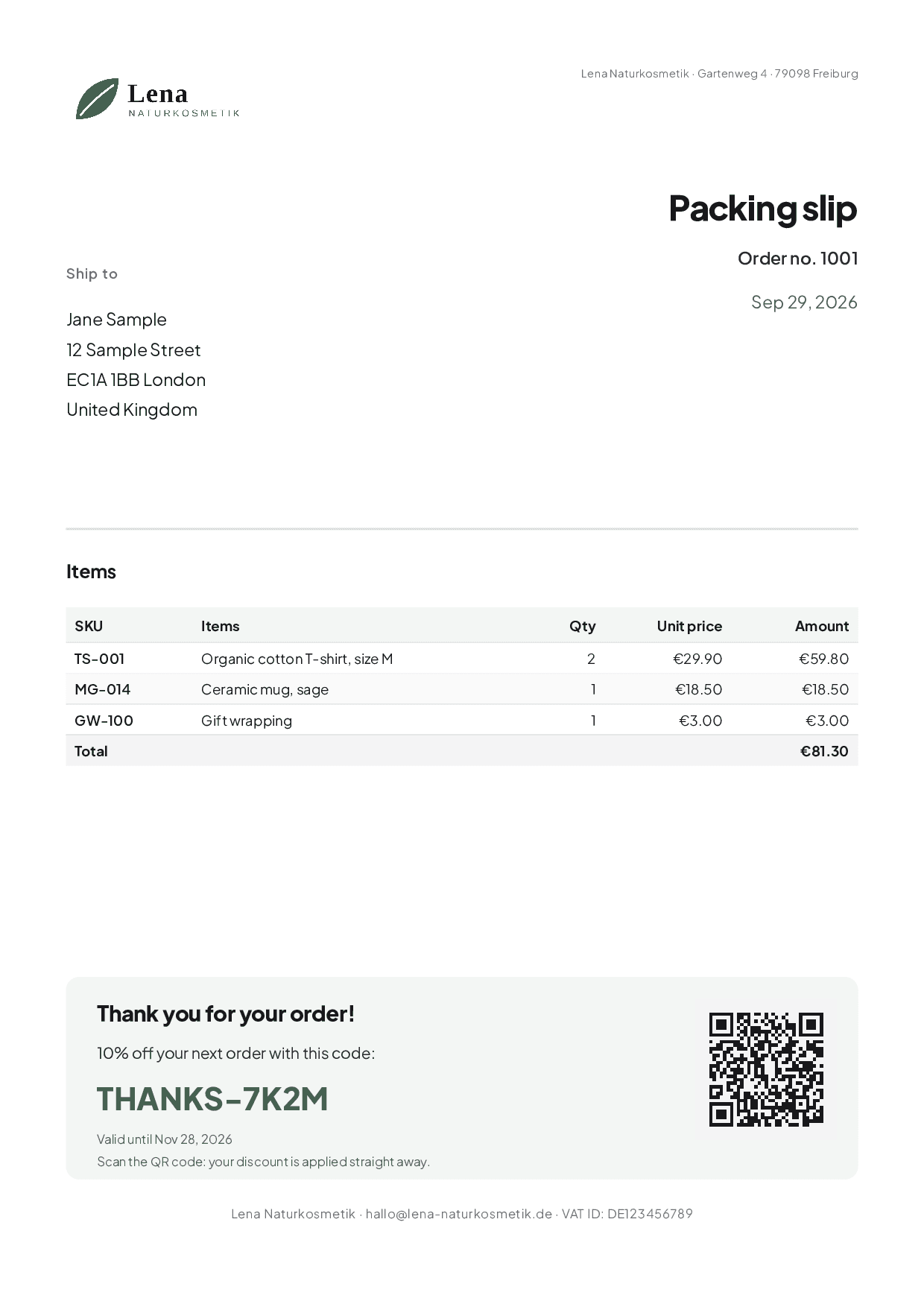
The packing slip goes into every parcel anyway. If it carries a discount code of its own for this order, your customer has a reason to shop with you again. Inkmate does this automatically, in your shop’s look.
Your customer scans the QR code, lands in your shop, and the discount is already applied. You see which sheet brought which order. Inkmate creates the print-ready PDF; printing and adding it to the parcel stays with you, as before.
How it works
Set it up once; after that, the sheet is created for every order by itself.
Pick a template
Choose a template for a packing slip, invoice or insert card. Set your logo, colours and fonts once; from then on every sheet carries your brand.
Switch it on once
One click is enough: for every paid order, Inkmate creates the finished PDF. Name, address and items come from the order, plus a discount code that only applies to this order.
Print and add it to the parcel
You print as usual, if you like all of the day’s packing slips as one PDF, and put the sheet in the parcel. Your customer scans the QR code, lands in your shop, and the discount is already applied.
See what it brings
Insights show which code was redeemed and how much revenue came from it.
Fits your routine
You don’t have to throw away anything you already have: not your packing slip, not your printing routine, not your design.
You keep your Shopify packing slip
Already printing with Shopify’s own packing slip? Then it stays as it is. You paste in a ready-made block once; the instructions with a copy button are in the app. From then on, every packing slip shows the order’s discount code with a QR code.
All packing slips at once
Select the orders in Shopify, choose “Print Inkmate packing slips”, and you get a single PDF. Open once, print once, instead of every order on its own.
Your own design
Already have a design from your designer, from Canva, or your letterhead? Upload it as a PDF or image. Inkmate places address, items and discount code on top; your design stays unchanged.
What you get out of it
Encourage repeat purchases without printing a single extra sheet
The packing slip goes into every parcel anyway. Inkmate turns it into an invitation to order again.
Every code works only once
The discount code belongs to exactly one order and can only be redeemed once. So you see exactly which sheet worked.
Looks like your shop
Packing slip, invoice and insert carry your logo, your colours and your fonts instead of looking like a standard form.
Invoices with all required details
Sequential invoice numbers, a check of the required details before issuing, and e-invoices in ZUGFeRD format that accounting software can read. Not a substitute for tax advice.
Adjust instead of designing from scratch
You start with a ready-made template and change what you want to change: text, colours, logo, order. Inkmate fills in the order details every time by itself.
The result is a PDF you can print right away: on your own printer or at a print shop that asks for bleed and crop marks.
All features (in German) →What Inkmate fills in by itself
- Name and address
- from the order
- Items, quantities, totals
- from the order
- Sender and VAT ID
- from your settings
- Discount code
- created by Inkmate in your shop
- QR code
- leads to your shop, discount applied
What you can use Inkmate for
Six examples. Pick the one that fits your shop.
How to get started once Inkmate is in the App Store
Until then, we’ll let you know via the waitlist.
- 1. Install
Click “Install” in the Shopify App Store. The Free plan costs nothing; you can choose a bigger one later in the app.
- 2. Pick a template
Open Inkmate: the templates appear straight away with your colours and your shop details.
- 3. Add it to your packing slip
You keep Shopify’s own packing slip and paste in a ready-made block once (instructions with a copy button in the app). Or you create the packing slips directly in Inkmate.
What Inkmate doesn’t do
- Inkmate doesn’t print or ship anything itself. Inkmate creates the print-ready PDF; you print on your own printer or hand it to your print shop.
- Inkmate has no built-in AI and sends no customer data to AI providers.
- Inkmate doesn’t send emails to your customers.
- Inkmate is not accounting software. You can export the invoices for your tax advisor.
More apps from us
Each app does its job on its own. You don’t need a second one to use Inkmate.